
Sapporo’s bike‑sharing service (electric‑assist)

Sapporo’s bike‑sharing service “Porocle”
Sapporo city center
Your journey expands with the red shared bicycles.
2026 season operating period: April 5 – November 15 Available 24 hours a day!
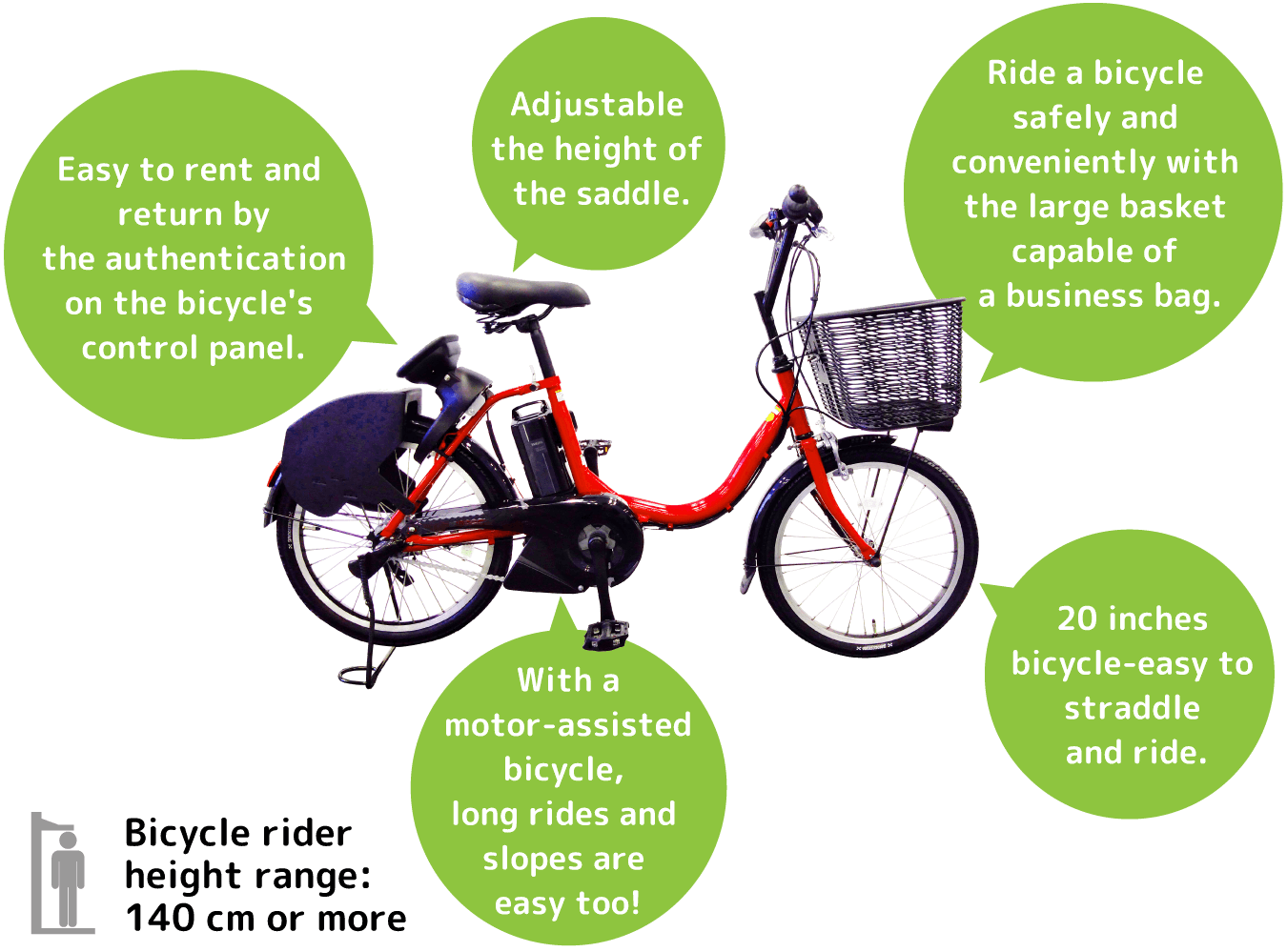
Porocle is
an electric‑assist
e-bike
Features of Porocle
・Choose a plan that fits your needs!
- Use with membership registration
≪30‑minute unit bike‑sharing≫
→ Best for short rental times
→ Ideal if you plan to use it regularly
※Register via the app (credit card required) - Use without membership registration
≪12‑hour pass purchased in person≫
→ Best for longer rental times
→ Convenient when renting multiple bikes at once
→ Peace of mind with face‑to‑face service
※No membership registration required to apply
※Click here for information on in‑person applications
・About 65 ports in the central area — very convenient
- You can return the bike to a different port from where you rented it
・All bikes are electric‑assist (e‑bikes)
・Includes insurance for safe and worry‑free use
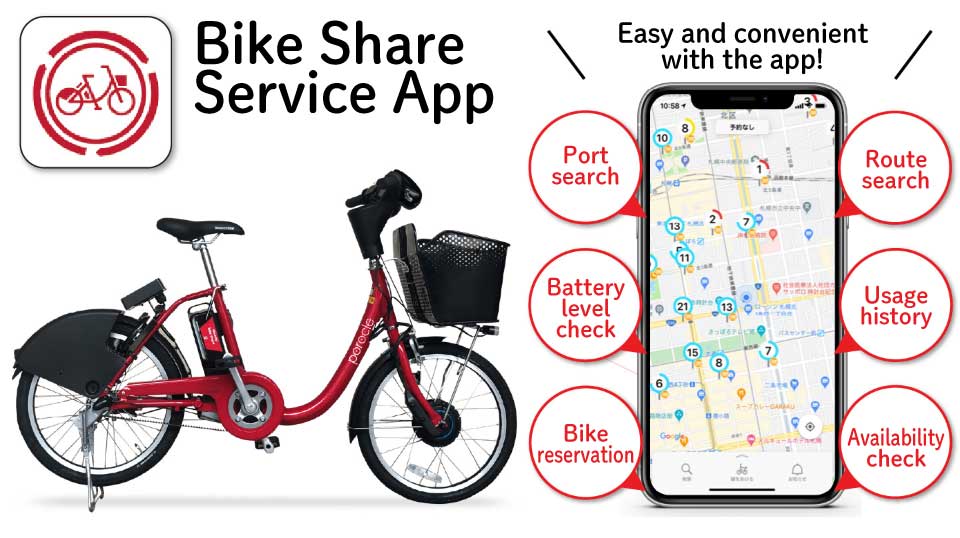
Find a Port
Ports may sometimes be closed or temporarily unavailable.
- Check your current location (see marker icon)
- Move the map to check your destination
- Select a cycling route using the course‑selection button
- Follow the route while checking your location and the course
(Please stop your bicycle when checking the map)
About the Fees
- 165 yen / 30 minutes
(If a single ride exceeds 30 minutes, an additional 165 yen per 30 minutes applies)
- If your usage exceeds 30 minutes, an additional fee of 165 yen will be charged for every 30 minutes.
- If the bike is not returned to a port, it will be treated as “parked,” and the fee calculation will continue.
- The above extension fees have a daily maximum of 3,000 yen.
Once the total reaches 3,000 yen, additional charges stop temporarily, and the second day’s charges begin after midnight (00:00).
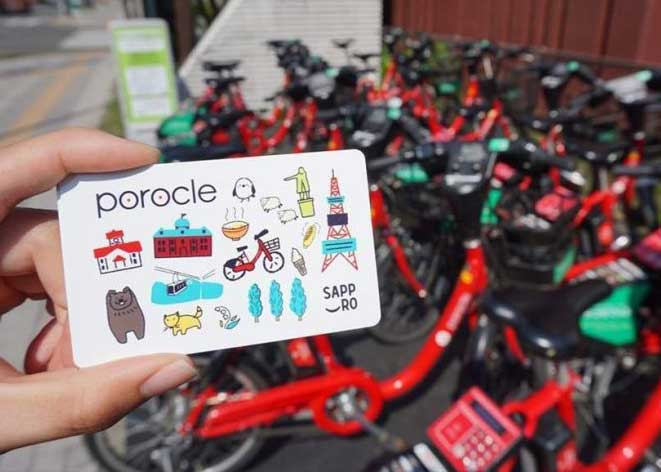
- 12‑Hour Pass: 2,500 yen (IC card included)
(Available for in‑person purchase at tourist information centers and hotels)
Try Using a Bike
Before You Ride
Register as a member (download the app) to use the one‑time rental option (Time‑based rental until return / charged in 30‑minute units). Credit card registration required
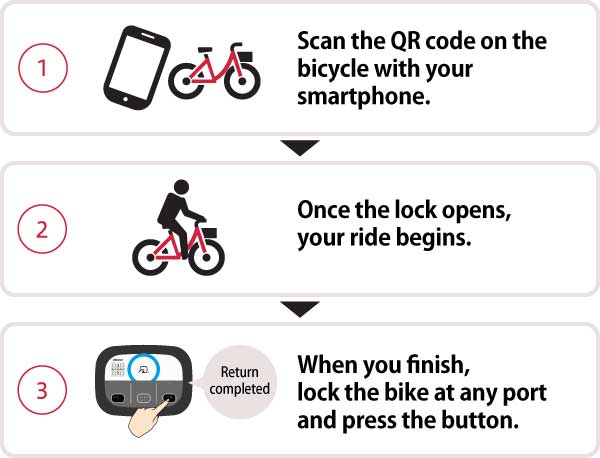
Start Using the Bike
- Check the number of available bikes at your intended port and make a reservation (You must start your ride within 20 minutes after
- Find the bike with your reservation number at the port
- Adjust the saddle height
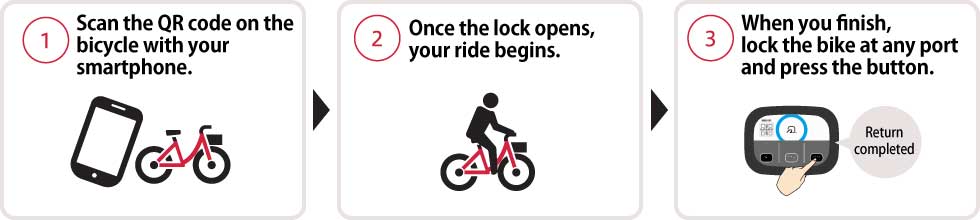
- Press the Start button and scan the QR code on the control panel
- The lock opens = success
- Start riding
Return
- Park the bike in a port
- Lock the bike and press the Return button
- A completion email will be sent = return successful
※ If the port is full, you cannot return the bike there. Please look for another port with available space.
Temporary Parking
Lock the bike at the place where you stop
※ Please make sure to lock the bike.
Unlock After Temporary Parking
- Press the Resume button
- Scan the QR code on the control panel
- Lock opens = success
- Start riding
Time‑based use without membership registration (in‑person purchase)
※ 12‑Hour Pass (valid for 12 hours) / Available at 7 locations such as hotels
※ Includes issuance of an IC card
※ The usage method differs slightly from the one‑time member system. Please check the official website below.
Frequently Asked Questions
You can find answers to many common questions below.
Please check this section before making an inquiry.
About the service
Q. What is the Porocle bike‑sharing service?
A.
Porocle is a bike‑sharing service operated by the certified Non-Profit Organization(NPO)Porocle.
Unlike a typical bicycle rental service, you can pick up a bike at any port (designated parking station) and return it to any other port.
It is a convenient shared‑use system with multiple ports available throughout the city.
Q. When is it convenient to use the Porocle bike‑sharing service?
A.
Porocle is useful as an everyday means of transportation—such as for commuting, school, or shopping—and is also ideal for sightseeing and business trips.
Since multiple ports are available throughout the city, you can borrow and return a bike at any port, making it easy and flexible to use whenever you need it.
Q. Are there any age or height restrictions for using the bicycles?
A.
There is no age restriction; however, minors must have the consent of a parent or guardian.
For safety reasons, only users who are 140 cm or taller may ride the electric‑assist bicycles.
The saddle height can be adjusted to a comfortable level.
Q. Is the app free to use?
A.
Yes, the app itself is free to use.
※ Data charges for using the app will be incurred separately.
※ Please be aware that international data usage may be expensive.
Q. I don’t know how to use the app.
A.
Please refer to the following page for instructions on how to use the app.
Q. Do you have bicycles for children?
A.
We’re sorry, but children’s bicycles are not available.
Only users who are 140 cm or taller can ride the bicycles.
Q. Do you have child seats?
A.
We’re sorry, but child seats are not available.
Q. Can I rent multiple bicycles at the same time?
A.
No. You cannot use multiple bicycles simultaneously with a single ID or a single 1‑Day Pass.
Q. Can I lend the bicycle I rented to someone else?
A.
No. Only the registered member or the person who purchased the pass may use the bicycle.
For corporate plans, only employees of the contracted company are permitted to use the bicycles.
Q. Does Porocle include insurance coverage? ?
A.
Yes. Porocle provides insurance that covers injuries to the user and liability for damages to third parties in case of an accident.
For details, please refer to the “Safety Support” page.
※ Any damages that exceed the compensation limits will be the responsibility of the user.
Q. Where can I get Porocle pamphlets or other materials?
A.
Pamphlets are available at each port.
Q. What is a “port”?
A.
“port” is a designated Porocle parking station.
There are more than 65 ports located mainly in central Sapporo, where you can borrow and return bicycles.
Q. What kinds of bicycles do you use?
A.
We use 20‑inch bicycles manufactured by Bridgestone and Yamaha company made in japan, including electric‑assist models.
Q. What are the operating dates?
A.
The operating period is shown on the top page of the Porocle website.
Please note that the schedule may change depending on weather conditions, and the service is closed during the winter season.
Detailed dates will be announced on the website as needed.
Q. Which app can I use with Porocle?
A.
Please use the “Docomo Bike Share – Bike Share Service” app.
Q. What can I do with the app?
A.
You can search for ports and check bicycle availability.
After registering as a member, you can also make ride reservations, check battery levels, report bicycle issues, view your usage details and history, review or change your contract information, and issue receipts.
How to use the system
Q. How do I rent a bicycle?
A.
You can unlock and use a bicycle by operating the panel located behind the saddle as follows. There are two types of panels:
Square Panel:
Press the “START” button, then enter the passcode you received when making your reservation, or hold your key over the sensor.
Round Panel:
Press the “Start” button, then scan the QR code shown on the panel with the app, or hold your key over the sensor.
※ Membership registration or the purchase of a 1‑Day Pass is required beforehand.
Q. How do I return a bicycle?
A.
After use, please return the bicycle to a port, lock it manually, and then press the “ENTER/Return” button on the operation panel.
Be sure to check the panel display as follows:
Square Panel:
After pressing ENTER, confirm that the word “Returned” appears on the display.
Round Panel:
When the Return button lights up, press it.
※ If you are a member, please also confirm the return completion via email or the app.
Q. How do I unlock and lock the bicycle?
A.
The unlocking and locking procedures differ depending on whether you use a key, passcode, or QR code.
<When using a key>
Unlock: Press “START/開始” and hold your key (IC card, etc.) over the sensor.
Lock: Manually lock the rear wheel, then press “ENTER/Return”.
※ The return is complete when “Returned(返却)” appears on the panel.
<When using a passcode>
Unlock: Press “START” on the panel and enter the unlock passcode issued at the time of reservation.
Lock: Manually lock the rear wheel, then press “ENTER”.
※ The return is complete when “Returned(返却)” appears on the panel.
<When using a QR code>
Unlock: Press “Start(開始)” on the panel and scan the QR code shown on the panel using the app.
Lock: Manually lock the rear wheel, and when the Return button lights up, press it.
Q. How far in advance can I make a reservation?
A.
A reservation is valid for 20 minutes. If the bicycle is not actually used within 20 minutes after completing the reservation, it will be automatically canceled.
※ As this is a shared service, please cancel your reservation as early as possible if you decide not to use it.
Q. How do I find the bicycle I reserved?
A.
Each bicycle has its bicycle number printed on the top of the rear wheel cover.
Q. Can I cancel my reservation?
A.
Yes. You can cancel your reservation through the app.
If you do not start using the bicycle within 20 minutes after making the reservation, it will be automatically canceled.
Q. Where can I check the locations of the ports?
A.
You can check port locations through the app,ports online map or on the website.
Q. Will there always be a bicycle available at a port? Can a port become full?
A.
If the port is empty or full, preventing rental or return, kindly proceed to the nearest available port.
Please note:
If a port is full, the panel will display “Full – Cannot Return”, and you will not be able to return the bicycle there.
Q. Do I have to return the bicycle to the same port where I rented it?
A.
No. You can return the bicycle to any port.
Feel free to rent from any port and return it to the one you prefer.
Q. Can I return a bicycle anywhere other than a port?
A.
No. Bicycles cannot be returned outside of designated ports.
Please make sure to return your bicycle to one of the official ports at the end of your ride.
Q. The racks at the port are full, but the app shows “Return Available.” Why is that?
A.
If there is a bicycle at the port that is marked as “Out of Service”, you can still return your bicycle within the port area even if all racks appear occupied.
In rare cases, there may also be a delay in communication, so please try the return procedure just in case.
<How to park when the racks are full>
Please neatly place the bicycle between the racks or within the port area and complete the return procedure.
Be careful not to block the road or leave the bicycle outside the designated port area.
When returning, always confirm that the operation panel displays “Returned(返却)”.
Q. Can I park the bicycle outside of a port?
A.
You may temporarily park the bicycle as long as it is within an area where bicycle parking is permitted.
Please lock the bicycle and park it in a safe place, such as a public bicycle parking area.
However, at the end of your ride, you must return the bicycle to an official port.
※ Please note that usage fees continue to apply even while the bicycle is temporarily parked.
※ If you park in a prohibited area and the bicycle is removed by authorities, you will be responsible for all costs related to removal, storage, and retrieval.
Q. How should I park at a port that does not have racks?
A.
Some Porocle ports have front‑wheel locking racks, while others do not.
At ports without racks, please follow the on‑site guidance and park your bicycle neatly within the port area, making sure it does not extend into the roadway.
Each port has a fixed number of parking spaces, so please check the app or on‑site signage for availability.
※ If the number of bicycles exceeds the allowed capacity, you will not be able to complete the return. Please return the bicycle to another port.
(If the return is not completed, additional charges will continue to apply, except for certain plans.)
Q. Can I check the bicycle availability at each port?
A.
Yes. You can check availability through the app or on the route‑search website “mixway.”
Q. Can I check how long I have been using the bicycle?
A.
Yes. While you are using the bicycle, the app displays your start time.
For bicycles with a square panel, you can also press the “START” button during use to display the elapsed time on the panel.
Q. How do I use the electric assist function?
A.
Press the power button located on the left side of the handlebar to turn the electric assist ON.
※ Before unlocking the bicycle, press the power button to check the battery level.
※ The assist function activates as soon as you start pedaling, so please be careful when starting off.
Q. Can I check the battery level of the electric‑assist bicycle?
A.
Yes. You can check the battery level on the power panel located on the left side of the handlebar.
Q. How far can an electric‑assist bicycle run on a full charge?
A.
The actual range varies depending on assist mode, riding conditions, rider’s physique, temperature, weather, and other factors.
The following values are reference estimates based on a full charge and are not guaranteed.
【Bridgestone Models】
Standard Pattern:
Power Mode = 48 km / Auto Mode = 67 km / Eco Mode = 94 km
Continuous Uphill Pattern:
Power Mode = 17 km / Auto Mode = 21 km / Eco Mode = 31 km
【Yamaha Models】
Standard Pattern:
Strong Mode = 48 km / Standard Mode = 61 km / Auto Eco Mode Plus = 91 km
Continuous Uphill Pattern:
Strong Mode = 17 km / Standard Mode = 18 km / Auto Eco Mode Plus = 23 km
Q. What happens if the battery of the electric‑assist bicycle runs out while I’m riding?
A.
You can continue riding the bicycle as a regular (non‑assist) bicycle, but once the battery is completely depleted, you will not be able to unlock or return the bicycle.
Please return the bicycle to the nearest port as soon as possible.
Before starting your ride, always check the battery level on the power panel located on the left side of the handlebar.
Q. If the battery runs out while I’m using the bicycle, can I get the bicycle (or battery) replaced?
A.
No. We do not offer bicycle or battery replacement services.
Please return the bicycle to the nearest port and start a new rental with another bicycle.
Q. How do I turn on the bicycle light?
A.
You can turn the light on or off by pressing the “Light” button (icon) on the power panel located on the left side of the handlebar.
The light also has an automatic mode — it will turn on automatically at night when the sensor detects low ambient light.
Fees and usage time
Q. What are the hours during which I can use the bicycles?
A.
Bicycles are available 24 hours a day.
Q. Can I check my usage history and charges?
A.
Yes. If you are on a membership plan, you can view your usage history and charges through the app.
Q. Will I be charged if I cancel my bicycle reservation?
A.
No, there is no cancellation fee.
※ For 12‑Hour Passes, the fee you have already paid cannot be refunded.
Q. Will I be charged while the bicycle is temporarily parked?
A.
Yes. For membership plans, the time is counted as usage until you return the bicycle to a port, so charges will continue to apply. Please keep this in mind.
12‑Hour Pass
Q. What should I do if it looks like I won’t be able to return the bicycle before the 12‑hour pass deadline?
A.
If you realize that returning the bicycle on time is difficult due to trouble or unexpected circumstances, please contact the Customer Support Center as soon as possible at 0570‑783‑677.
Membership registration
Q. How do I register as a member?
A.
Download the dedicated app and sign up using a social media account.
You can register easily without entering your name or other personal details.
※ There is no registration fee.
Q. Is the app free to use?
A.
Yes. The dedicated app can be downloaded free of charge.
※ Please note that any data communication fees incurred during download or use will be your responsibility.
Q. Can I register using a family member’s smartphone?
A.
No. Registration must be done with a smartphone that you normally carry.
This is because we need to be able to contact you while you are using the bicycle, so registration with a device you do not usually have with you is not allowed.
Q. Can I register as a member from overseas?
A.
Yes. You need a smartphone that can receive SMS messages.
※ You must be able to receive the verification code sent to your mobile phone number.
Q. When I try to register in the app, it shows a “system error.” What could be the cause?
A.
Please check whether you have set the same value for both your password and user ID.
Registration cannot be completed if they are identical, so please set different values.
If this does not apply to your situation, please contact the Customer Support Center at 0570‑783‑677.
Q. If I want to use the service again next year, do I need to register again?
A.
No. You do not need to register again, and there is no renewal fee.
Q. I’m having trouble completing my membership registration.
A.
Please refer to the Membership Registration section for guidance.
If you are unsure how to proceed, please contact the Customer Support Center at 0570‑783‑677.
Troubleshooting & accidents
Q. What happens if I leave the bicycle somewhere other than a designated port?
A.
We may contact you and ask that you return the bicycle to a port immediately.
If we cannot reach you, or if you are unable to return the bicycle yourself, Porocle will retrieve it on your behalf. In such cases, you will be responsible for all associated costs, including the collection fee (see below) and any additional usage charges accrued until the time of retrieval.
If the bicycle is left in an area designated by Sapporo City as a No‑Parking Zone and is removed by the city, you must personally retrieve the bicycle and return it to a port. You will also be required to pay the city’s removal fee (3,000 yen). Please be careful.
Collection fees:
Within the “Port Map” service area: 5,500 yen
Outside the “Port Map” service area: 11,000 yen
Q. What should I do if I cannot return the bicycle to a port?
A.
Please contact the Customer Support Center at 0570‑783‑677.
If you are unable to return the bicycle yourself, Porocle will retrieve it on your behalf. In that case, you will be charged the collection fee (see below), as well as any additional usage fees accrued until the time of retrieval.
Collection fees:
Within the “Port Map” service area: 5,500 yen
Outside the “Port Map” service area: 11,000 yen
Q. What should I do if I find a problem with the bicycle before renting it? (e.g., flat tire, saddle issues, chain, brakes, etc.)
A.
We’re sorry for the inconvenience, but please choose and use another bicycle.
Also, please report the issue using the “Report a Problem” button in the app.
※ You can submit up to two reports per day (00:00–23:59).
Q. What should I do if a problem occurs with the bicycle while I am using it? (e.g., flat tire, saddle issues, chain, brakes, etc.)
A.
We’re sorry for the inconvenience, but please bring the bicycle to the nearest port and switch to another available bicycle.
To help us check the condition of the bicycle, please report the issue using the “Report a Problem” button in the app.
※ You can submit up to two reports per day (00:00–23:59).
Q. What should I do if I am involved in an accident?
A.
If you are involved in an accident while using the bicycle, please take the legally required actions immediately, such as contacting the police.
After that, please report the accident to the Customer Support Center (0570‑783‑677) and provide details including the date and time, location, cause, and circumstances of the accident.
If negotiations or settlements with the other party are necessary, you must handle them at your own responsibility.
Additionally, if our organization suffers damages—including cases where we are forced to compensate a third party—we may charge you for those damages.
Accidents that occur during use are covered by insurance; however, we cannot take responsibility for matters outside the scope of insurance coverage.
※ Insurance fees are included in the usage fee.
Q. What should I do if I cannot unlock the bicycle?
A.
The lock may be caught on something, so please first check whether it can be moved by hand.
If the lock mechanism itself appears to be malfunctioning, please use another bicycle.
If you are unable to use another bicycle or still cannot unlock it, please contact the Customer Support Center.
Q. I parked the bicycle at a port, but I cannot complete the return process. What should I do?
A.
If pressing the “ENTER” button on the square control panel shows “Err”, or if the ring on the round control panel flashes red and you hear the message “You cannot return it here…”, please wait about 5 seconds and try again.
If the return still cannot be completed, please check the following:
Is the bicycle correctly parked in the designated position?
Did you lock the bicycle?
If the issue is not resolved after checking these points, please contact the Customer Support Center at 0570‑783‑677.
※ If the port is full, please return the bicycle to another port.
Q. I entered the start‑use passcode incorrectly three times on the square panel, and “A001” appeared. What should I do?
A.
After some time, you will be able to enter the passcode again.
Please try again using the correct passcode.
Q. The square control panel shows a code (E001, E002, E003, A002, A005, A006, A007). What should I do?
A.
The bicycle is in a state where it cannot be used.
If the code appears while you are using the bicycle, please contact the Customer Support Center at 0570‑783‑677.
Q. I cannot return the bicycle because the battery is dead. What should I do?
A.
After manually locking the rear wheel, please contact the Customer Support Center at 0570‑783‑677.
Q. What should I do if the bicycle is stolen?
A.
Please contact the Customer Support Center at 0570‑783‑677.
If the theft occurs due to the user’s negligence, you will be responsible for the actual costs.
Q. What should I do if the bicycle has been removed (impounded)?
A.
Please contact the Customer Support Center at 0570‑783‑677.
If you park the bicycle in an area designated by Sapporo City as a No‑Parking Zone, it may be removed by the city.
If the bicycle has been removed, you must retrieve it yourself and return it to a port. You will also be responsible for all related costs, including the city’s removal fee (3,000 yen) and any additional usage fees until the bicycle is returned. Please be careful.
If you are unable to retrieve the bicycle yourself, Porocle can collect it on your behalf. In that case, a collection fee of 5,500 yen will be charged.
※ For locations outside the “Port Map” area, the fee is 11,000 yen.
Q. I left something behind at a port or on a bicycle. Where should I inquire?
A.
Any lost items found are reported to the nearest police station.
Please contact the nearest police station directly to inquire about your lost property.
Q. I found a Porocle bicycle that appears to be abandoned. Who should I contact?
A.
Please contact the Customer Support Center at 0570‑783‑677.
We will check the location and situation and take appropriate action.
Q. What should I do if I lose my key?
A.
Please delete the registered card key or smartphone key from the “Account” page in the app.
If you want to use another IC card as your authentication method, or if you later find the lost key, please register it again using the “Key Registration” function.
Q. I temporarily parked my bicycle at or near a port, but it was automatically returned. Why did this happen?
A.
If a bicycle is locked at a port but the “ENTER” button has not been pressed, the system will automatically complete the return process 15 minutes after the lock is engaged.
This function prevents excessive extension fees due to incomplete returns and ensures that the bicycle becomes available for the next user.
If you intend to make a temporary stop, please park the bicycle somewhere other than a port.
(Do not park in No‑Parking Zones or on sidewalks.)
Please also note that even near a port, the bicycle may receive the port’s signal and trigger automatic return.
※ IC‑card‑type 12‑hour passes are not subject to
© CEDARS Communications Co.,Ltd. all right reserved. 悠悠北海道 ®